Generation Results

Results will be displayed here

PicClear AIAI Image Upscaler & Portrait Enhancer

Turn blurry images into HD. Save old photos and upscale in batches with one click.

How to unblur a photo? AI does it in one click

Say goodbye to low-quality images. Our image upscaler provides an all-in-one HD restoration solution. The powerful smart algorithm focuses on fixing blurry photos without complex operations, truly delivering stunning one-click clarity.

AI Image Upscaling across platforms
Unblur Image

Unblur Image

Processes blurry, out-of-focus, or low-res photos by supplementing missing edge pixels via algorithms, making them sharp and clear.

Face Processing

Face Processing

Utilizes face restoration tech to enhance features in blurry portraits or selfies, improving clarity while maintaining original facial characteristics.

AI Repainting

AI Repainting

Performs HD processing on low-clarity assets, removing jagged edges and roughness. The repainted result closely matches the original outline.

Preserve Details

Preserve Details

Achieves AI image enlargement while locking in original texture features, avoiding an over-smoothed look to preserve authentic details.

Professional Restoration Showcase

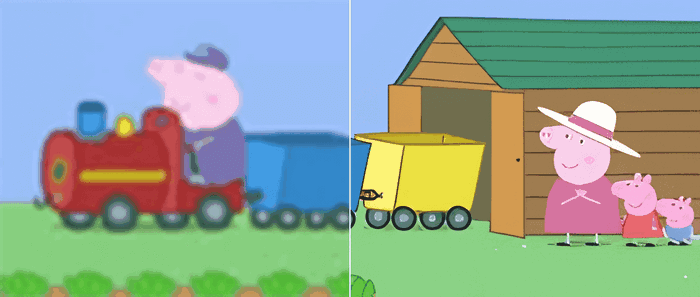
Drag the slider to visually compare AI performance across different scenarios.

Face Enhanced
Blurry Original
Blurry Original
Face Enhanced
Face restoration tech effectively solves blur and low-pixel issues in old photos through feature point reconstruction, precisely enhancing facial clarity.
AI Repainted
Rough Original
Rough Original
AI Repainted
Performs HD processing on low-clarity assets to remove jagged edges. The result highly conforms to the original outline, ensuring a natural look.

Service Guidelines

Transparent AI processing workflows to ensure a smooth experience.

Smart Adjustment

When the total resolution of the image exceeds 2.56 million pixels (1600 × 1600, approximately 2.5K), the system will automatically adjust the ratio to maintain stability.

Processing Limits

Free plan is limited to 5MB per image (no batch); Premium supports 20MB per image and batch processing of up to 15 images.

Auto Compression

Generated files exceeding 30MB will be automatically compressed to ensure a smooth download.

Supported Formats

We support the processing of PNG, JPG, JPEG, BMP, and WEBP formats.

Scheduling Mechanism

Premium users with lower daily usage get priority. A new batch can only be uploaded after the previous one finishes.

Privacy Commitment

Results are kept for a maximum of 24 hours before being permanently deleted. Please download promptly.

Three Simple Steps to Revive Your Images

No complex software needed. Just a few clicks and AI will enhance the quality automatically.

1

Upload Image

Upload images to be processed (JPG, PNG, WEBP). Premium users can batch upload.

2

Select Mode

Choose processing modes like Anime, Face Enhance, or AI Repaint, and set the resolution.

3

Process & Download

Click start, and once finished, download all HD results with one click in a ZIP file.

Frequently Asked Questions

If you have any other questions or cannot find the answer you need, please feel free to contact us. We will provide technical support as soon as possible.

Does image resolution affect processing speed?

Yes. The processing time for a single image mainly depends on its original resolution. Generally, lower resolutions mean a lighter GPU workload and faster processing speeds. Conversely, ultra-high-definition images require more time for pixel-level reconstruction.

What membership plans and payment methods do you offer?

To meet diverse needs, we offer highly cost-effective annual plans as well as flexible lifetime credits. Annual plans are ideal for frequent users, while lifetime credits never expire and are deducted as you go, making them perfect for occasional enhancement needs.

How does your tool make blurry photos clear?

We integrate industry-leading smart algorithms that automatically detect image edges and perform pixel-level feature enhancement. Whether it's an out-of-focus photograph or a low-resolution thumbnail, our "Clear Image" mode restores it to crisp, sharp quality.

Can the Portrait Enhancement mode handle selfies or out-of-focus photos?

Perfectly. This mode utilizes specialized facial restoration technology to effectively fix facial blur in selfies and old photos. It enhances the clarity of facial features while maintaining the original appearance and consistency.

Will the AI pixel-level redrawing alter the look of my original image?

It preserves the original look as much as possible. This mode is primarily used to repair jagged edges and roughness in low-quality media. The redrawing process strictly follows the original outlines, ensuring that while the quality is enhanced, the result looks incredibly natural and identical to the original subject.

Why am I getting a "Task Timeout" or "Processing Failed" prompt?

The processing time limit for a single image is 90 seconds. If the image has an extremely high pixel count and compression is not enabled, a timeout error may occur. We recommend lowering the upscaling ratio or turning on the "Compression" option before trying again.

What is the main difference between the Free and Premium versions?

The free version limits single image uploads to 5MB and does not support batch processing. The Premium version supports large image uploads up to 20MB, offers efficient batch processing capabilities, and prioritizes your tasks when the system queue is congested.

What does the "Account logged in from another browser" prompt mean?

To prevent the illegal abuse of computing resources and ensure your account security, the system only allows a single active login session. If you log in from another browser, the connection on the previous browser will be automatically disconnected.

Next Step in Creation

Pair with these tools to perfect your artwork